การตั้งค่า Email บนโปรแกรม Mail สำหรับ Windows 10
สำหรับการตั้งค่า Email บน Mail สำหรับ Windown 10 ตามคู่มือการใช้งานฉบับนี้สำหรับลูกค้าที่ใช้งานระบบอีเมล์เซิร์ฟเวอร์ Cloud E-mail Hosting เท่านั้นค่ะ
1. ไปที่เมนู Windows เพื่อเลื่อก Mail สำหรับการตั้งค่าบัญชีอีเมล
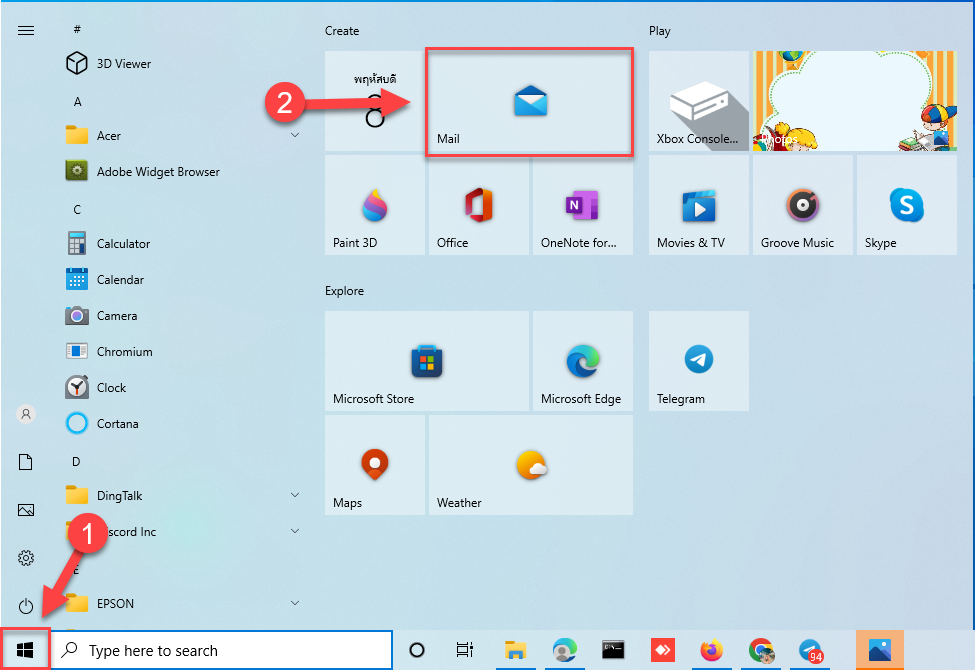
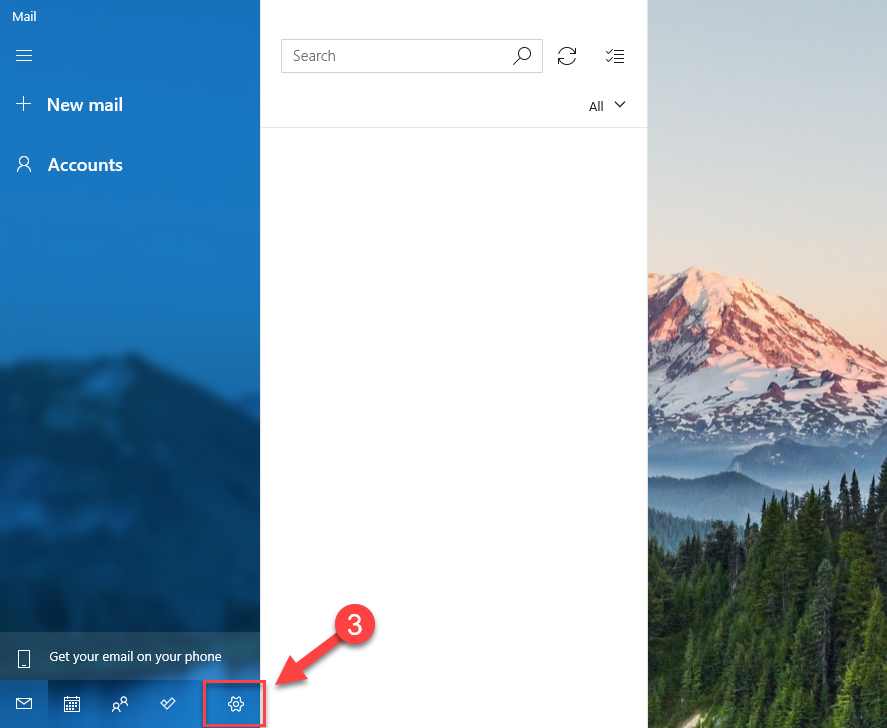
2. เมื่อเข้าสู่หน้าโปรแกรมให้กดที่เมนูตั้งค่า ตามลูกศรหมายเลข 3
3. เลือกที่เมนู Manage accounts ตามลูกศรหมายเลข 4

4. กดที่เมนู Add accounts เพื่อเพิ่มบัญชี Email

5. กดที่เมนู Advanced setup เพื่อตั้งค่า ตามหมายเลข 6

6. กดที่เมนู Internet email ตามหมายเลข 7

7. กรอกข้อมูลบัญชีอีเมลที่ต้องการตั้งค่าการใช้งาน รายละเอียดดังนี้ค่ะ
Email Address : Email ที่ต้องการใช้งาน
User name : ชื่อผู้ใช้งาน
Password : รหัสผ่านบัญชีอีเมล
Account name : บัญชีของผู้ใช้งาน

8. Send your messages using this name : ชื่อผู้ใช้งานที่จะทำการส่งข้อความ
Incoming Outgoing email server : server ที่จะใช้ทำการรับ Email
**สำหรับ Incoming mail Server และ Outgoing mail Server ให้ยึดตามอีเมลข้อมูลการใช้งานเท่านั้น
Account type : ชนิดของการเชื่อมต่อสามารถเลือกได้ระหว่าง IMAP4 กับ POP3
สำหรับการเลือก POP หรือ IMAP ขึ้นอยู่กับความต้องการใช้งานของผู้ใช้งาน

9. กดเลือกการใช้งาน SSL for incoming และ outgoing ออก
10. จากนั้นให้กด Sign in ตามหมายเลข 11.

11. จากนั้นให้กด Done เป็นการเสร็จสิ้นการตั้งค่า

- Categories:
- Cloud
- Tags:
- Cloud
- Cloud Server
Related Posts
หมวดหมู่ที่น่าสนใจ
- Account Settings
- AD Server
- AI
- Alibaba Cloud
- Anti-Spam Gateway
- AWS Amazon Web Services
- Campaign
- CentOS/AlmaLinux
- Cloud
- Cloud Backup
- Cloud Communication
- Cloud Migration
- Cloud Security
- Cloud Server Management
- Cloud Solution
- Cloud Solution for Government
- Cloud Solutions by Industry
- Cloud Storage
- Cloud VPS App Plus +
- Cloud VPS DirectAdmin
- Cloud VPS Plesk
- CSR
- Cyber Security
- Cybersecurity
- Data Sovereignty
- Database Server
- DDoS
- Digital Tranformation
- Digital Transformation
- Direct Mail
- Directadmin
- Domainname
- Ecommerce
- ERP
- Generative AI
- Getting Started
- Google Cloud
- Google G Suite
- Huawei Cloud
- IT News
- Linux Server
- Managed Cloud Services
- Managed Service Provider
- Manual
- Microsoft
- Microsoft 365
- Microsoft Azure
- News
- On-premise
- Private Mail Server
- Promotion
- Recommend Solution (Enterprise)
- Server
- Sovereign Cloud
- THAI DATA CLOUD Platform
- Ubuntu
- Ubuntu
- Uncategorized
- VMware
- VPS Server
- Web Design
- Web Hosting
- Web Hosting (DirectAdmin)
- Web Hosting (Plesk)
- Web Technologies
- Windows Server
- Wordpress
- Zimbra
- เรื่องราวความประทับใจ
- โซลูชันสำหรับธุรกิจการผลิตและยานยนต์
- โซลูชันสำหรับธุรกิจการศึกษา
- โซลูชันสำหรับธุรกิจการเงิน
- โซลูชันสำหรับธุรกิจขนส่งและกระจายสินค้า
- โซลูชันสำหรับธุรกิจค้าปลีก
- โซลูชันสำหรับธุรกิจท่องเที่ยว
- โซลูชันสำหรับธุรกิจบริการสุขภาพและโรงพยาบาล
- โซลูชันสำหรับธุรกิจประกันภัย
- โซลูชันสำหรับธุรกิจพลังงานและสาธารณูปโภค
- โซลูชันสำหรับธุรกิจสื่อสารมวลชนและเอ็นเตอร์เทนเมนท์
- โซลูชันสำหรับธุรกิจอสังหาริมทรัพย์
- โซลูชันสำหรับธุรกิจเทคโนโลยี