การเพิ่มบัญชี Google/Gmail Account บน Mac OS
การตั้งค่า Mail บน Mac สามารถทำได้ตามขั้นตอนต่อไปนี้
1. เปิดการเข้าถึง Google Apps ดูวิธี การอนุญาตแอปที่มีความปลอดภัยน้อย
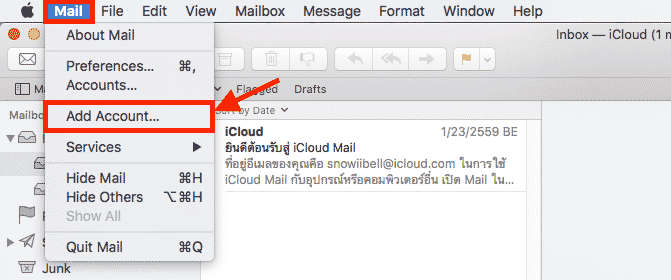
2. เมื่อเปิดการอนุญาตแอปที่มีความปลอดภัยน้อยเรียบร้อยแล้ว ให้เปิด Mail ใน Mac ขึ้นมา จากนั้น เลือกที่ Mail > Add Account…
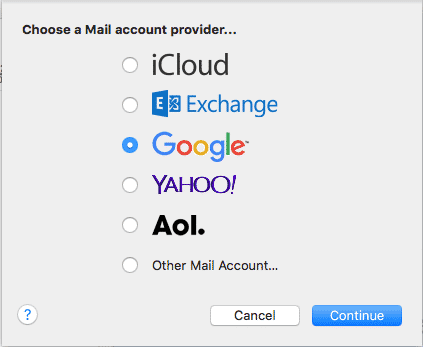
3. เลือก Google
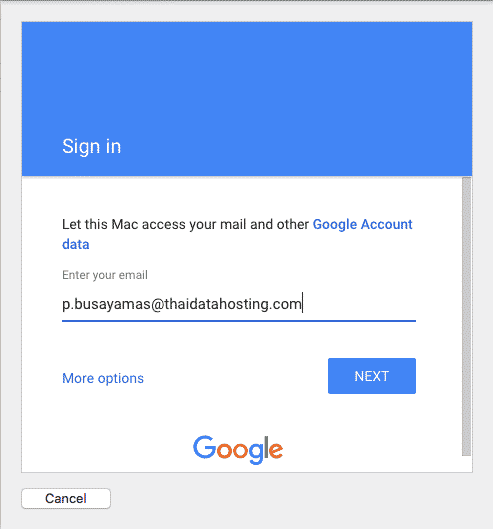
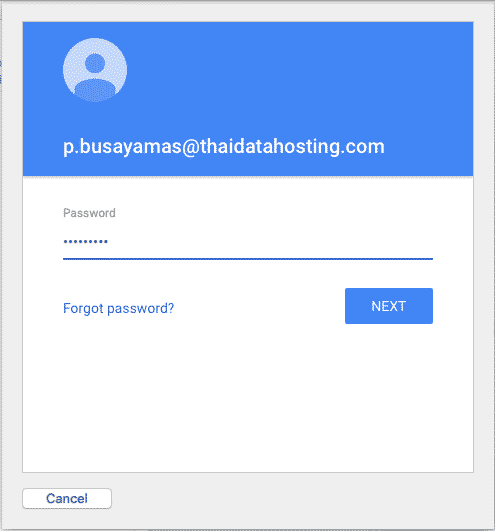
4. ใส่ Username และ Password ของอีเมลที่ต้องการตั้งค่าใน Mac
5. เลือกแอปที่ต้องการใช้กับอีเมลที่ต้องการตั้งค่า
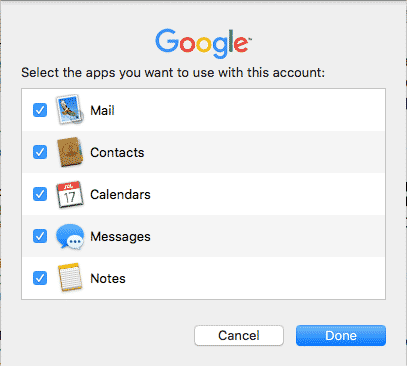
6. เมื่อกด Done ก็เป็นอันตั้งค่าเรียบร้อย จะเห็นได้ว่ามี Account ชื่อ Google เพิ่มขึ้นมา
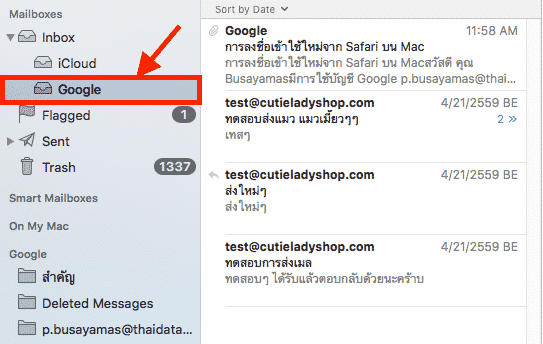
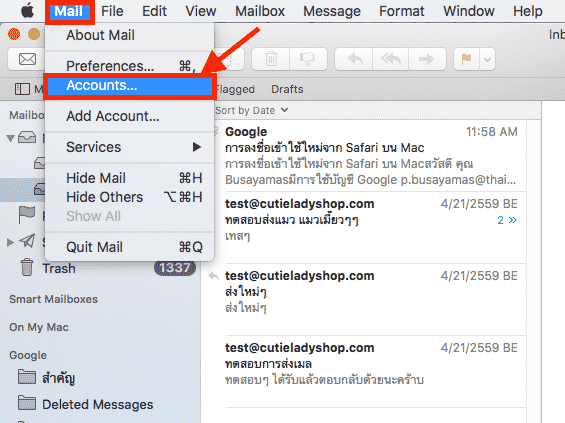
7. หากต้องการเปลี่ยนชื่อ Account ที่แสดงบน Mac สามารถทำได้โดย เลือกที่ Mail > Accounts…
8. เลือกที่ Account ที่ต้องการเปลี่ยนชื่อ จากนั้นเลือกที่ Details…
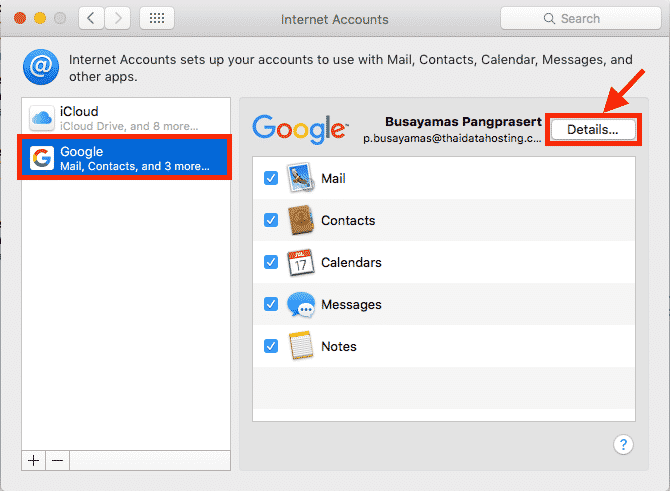
9. ในช่อง Description จะเป็นชื่อที่แสดงในขณะนี้
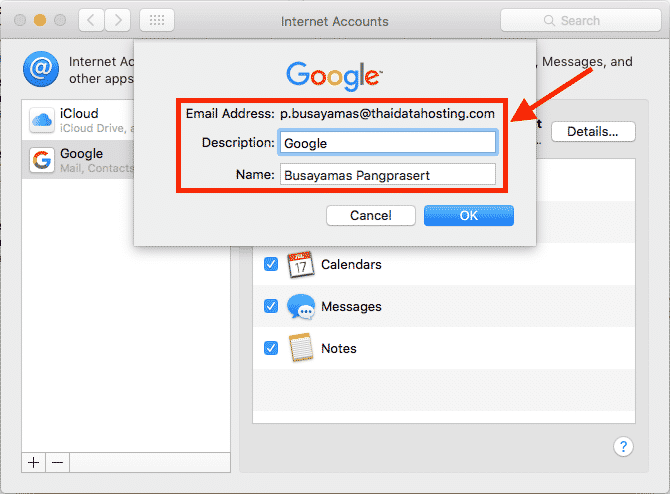
10. เปลี่ยนชื่อได้ตามต้องการ
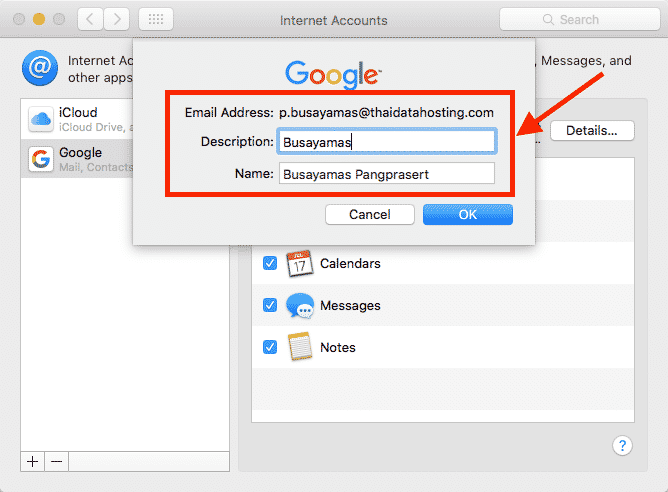
11. เมื่อเปลี่ยนชื่อเรียบร้อยแล้วก็ปิดหน้า Account ได้เลยครับ
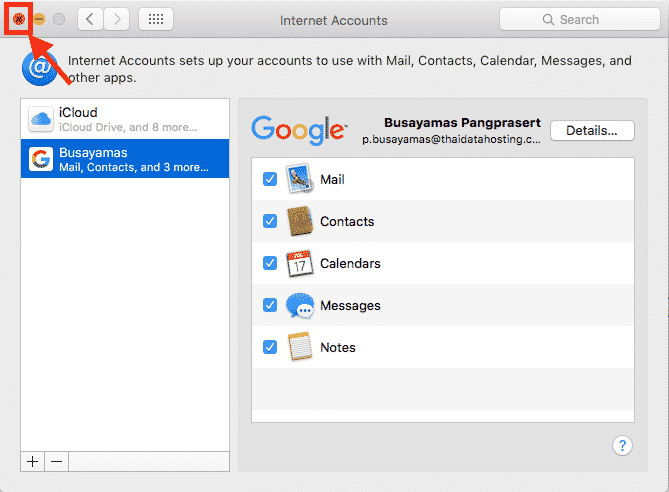
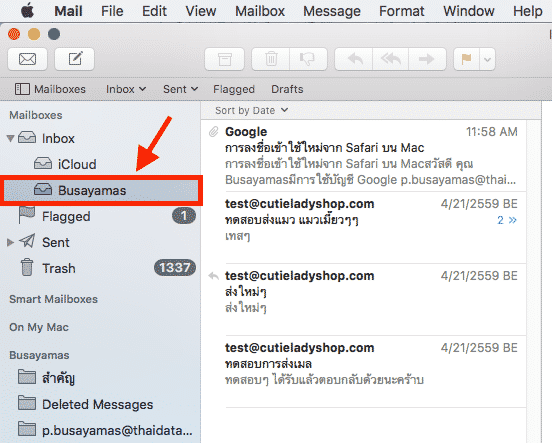
12. เราจะเห็นได้ว่าชื่อได้ถูกเปลี่ยนแปลงเรียบร้อยแล้วครับ
- Categories:
- Cloud
- Tags:
- Cloud
- Cloud Server
Related Posts
หมวดหมู่ที่น่าสนใจ
- Account Settings
- AD Server
- AI
- Alibaba Cloud
- Anti-Spam Gateway
- AWS Amazon Web Services
- Campaign
- CentOS/AlmaLinux
- Cloud
- Cloud Backup
- Cloud Communication
- Cloud Migration
- Cloud Security
- Cloud Server Management
- Cloud Solution
- Cloud Solution for Government
- Cloud Solutions by Industry
- Cloud Storage
- Cloud VPS App Plus +
- Cloud VPS DirectAdmin
- Cloud VPS Plesk
- CSR
- Cyber Security
- Cybersecurity
- Data Sovereignty
- Database Server
- DDoS
- Digital Tranformation
- Digital Transformation
- Direct Mail
- Directadmin
- Domainname
- Ecommerce
- ERP
- Generative AI
- Getting Started
- Google Cloud
- Google G Suite
- Huawei Cloud
- IT News
- Linux Server
- Managed Cloud Services
- Managed Service Provider
- Manual
- Microsoft
- Microsoft 365
- Microsoft Azure
- News
- On-premise
- Private Mail Server
- Promotion
- Recommend Solution (Enterprise)
- Server
- Sovereign Cloud
- THAI DATA CLOUD Platform
- Ubuntu
- Ubuntu
- Uncategorized
- VMware
- VPS Server
- Web Design
- Web Hosting
- Web Hosting (DirectAdmin)
- Web Hosting (Plesk)
- Web Technologies
- Windows Server
- Wordpress
- Zimbra
- เรื่องราวความประทับใจ
- โซลูชันสำหรับธุรกิจการผลิตและยานยนต์
- โซลูชันสำหรับธุรกิจการศึกษา
- โซลูชันสำหรับธุรกิจการเงิน
- โซลูชันสำหรับธุรกิจขนส่งและกระจายสินค้า
- โซลูชันสำหรับธุรกิจค้าปลีก
- โซลูชันสำหรับธุรกิจท่องเที่ยว
- โซลูชันสำหรับธุรกิจบริการสุขภาพและโรงพยาบาล
- โซลูชันสำหรับธุรกิจประกันภัย
- โซลูชันสำหรับธุรกิจพลังงานและสาธารณูปโภค
- โซลูชันสำหรับธุรกิจสื่อสารมวลชนและเอ็นเตอร์เทนเมนท์
- โซลูชันสำหรับธุรกิจอสังหาริมทรัพย์
- โซลูชันสำหรับธุรกิจเทคโนโลยี