ติดตั้ง SSL ฟรีของ Cloudflare ให้กับ Wordpress
การใช้งาน SSL ฟรีของ Cloudflare สามารถทำได้โดย สร้าง Account Cloudflare ของตนเองก่อน
เมื่อดำเนินการชี้ DNS มาที่ Cloudflare เรียบร้อยแล้วให้ทำตามขั้นตอนดังนี้
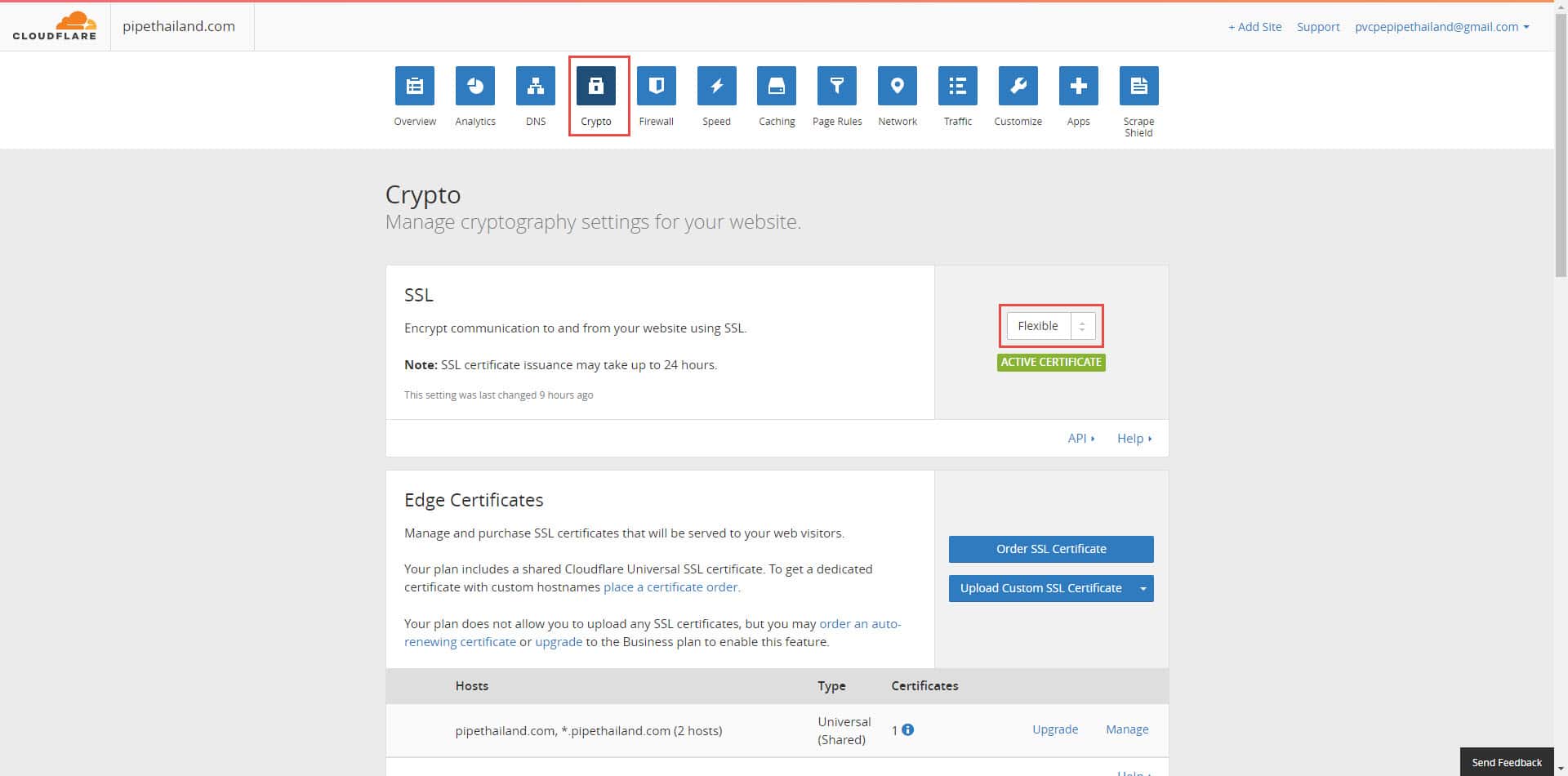
1. เลือกเมนู Crypto จากนั้น เลือกเป็น Flexible และรอให้ทาง Cloudflare Active Certificate (ขึ้นสีเขียวตามภาพ) ก่อน
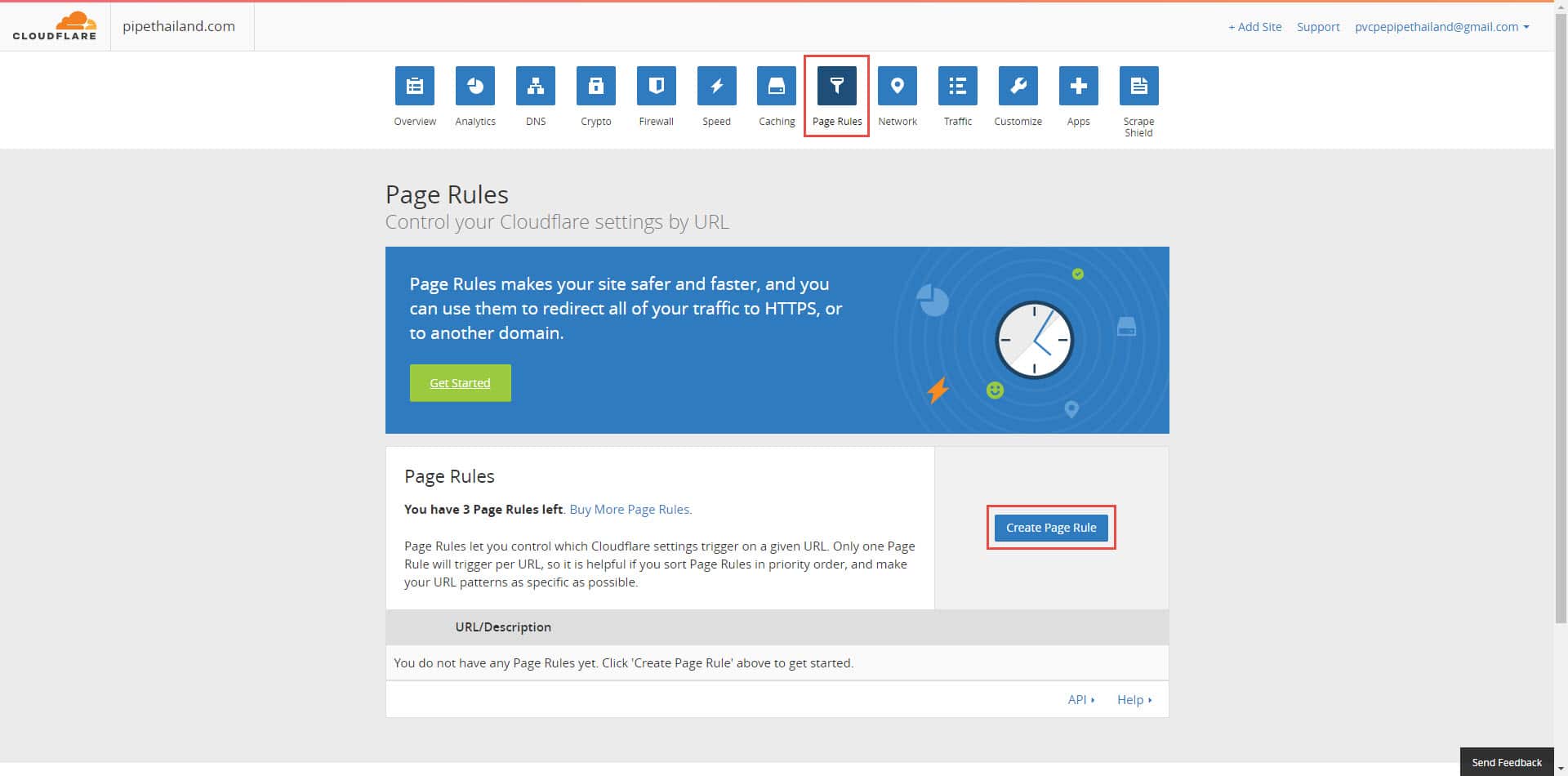
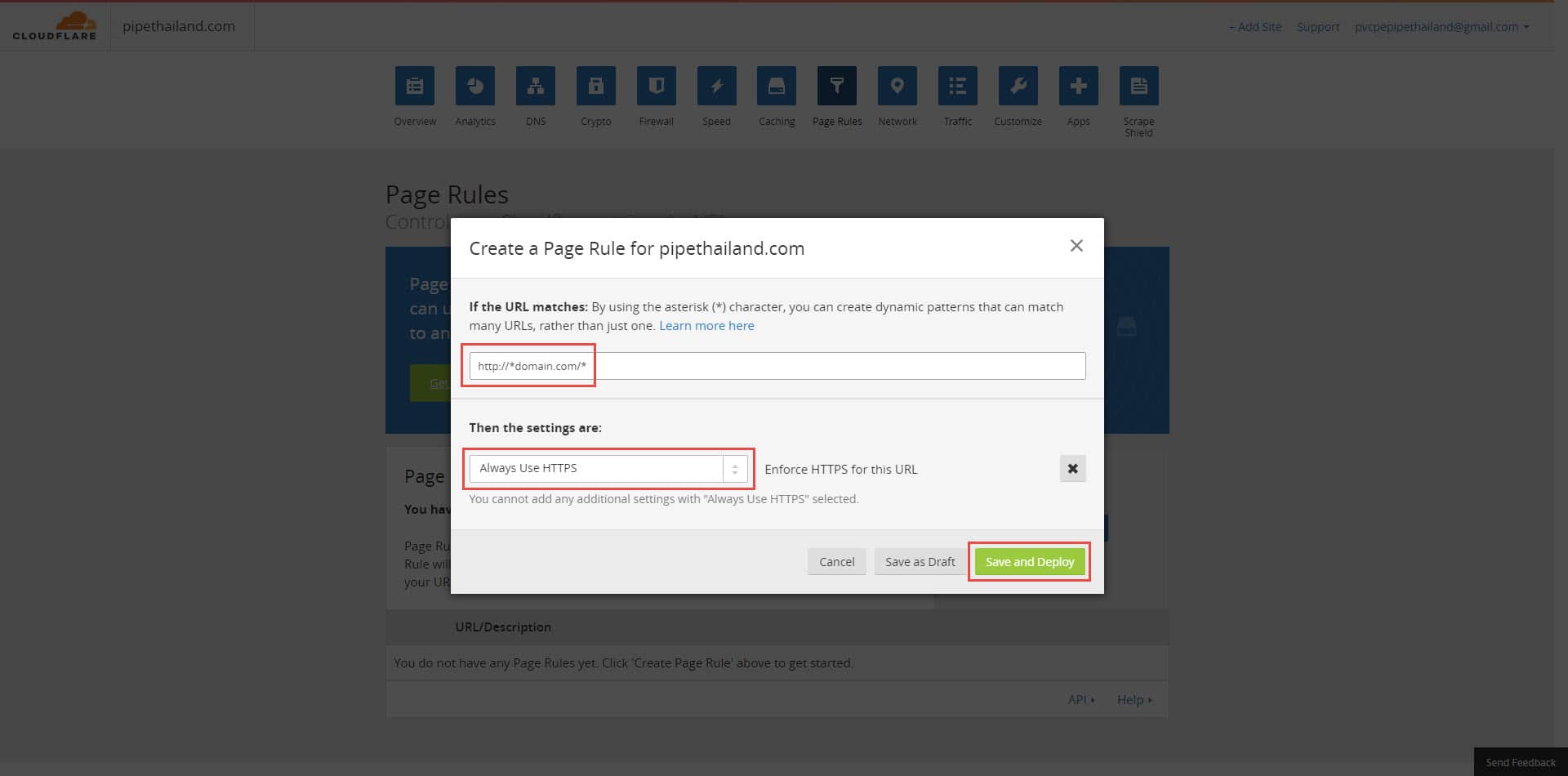
2. เมื่อ SSL Active เรียบร้อยแล้ว ให้เลือกเมนู Page Rules และกดที่ปุ่ม Cearte Page Rules เพื่อสร้าง Page Rules ใหม่
3. ใส่ URL ของโดเมนเนมที่ต้องการนำไปใช้ โดยใส่เป็น http://*domain.com/* จากนั้นเลือก Then the setting are : เป็น Always Use HTTPS และกด Save and Deploy
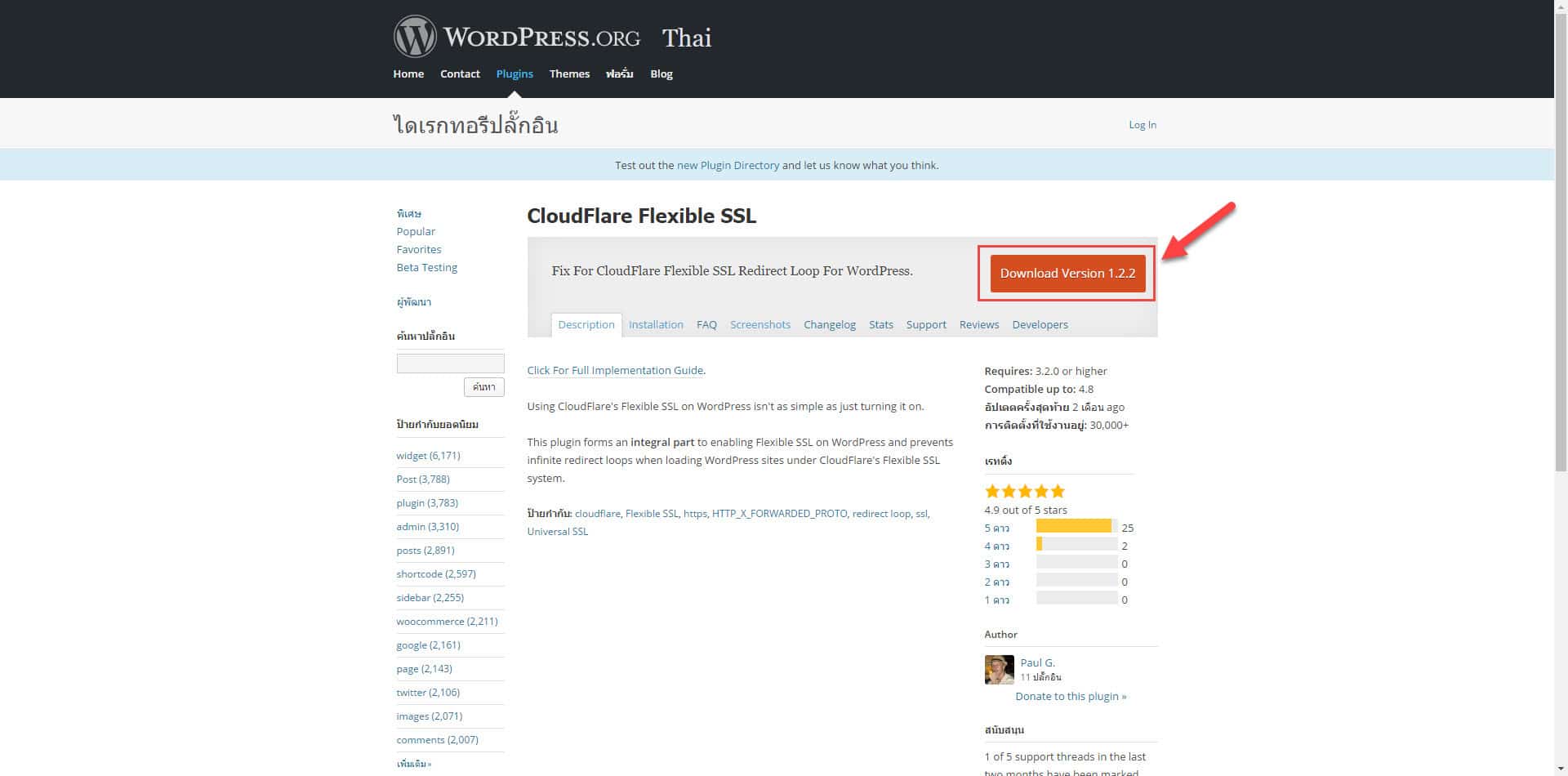
4. เมื่อตั้งค่าที่ Cloudflare เรียบร้อยแล้ว เราจะทำให้ WordPress ขึ้น https โดย ดาวน์โหลดไฟล์ปลั๊กอิน CloudFlare Fiexible SSL ไปติดตั้งในเซิร์ฟเวอร์ของเว็บไซต์ที่ต้องการใช้งาน ในโฟลเดอร์ wp-content/plugin/ และ Login WordPress เพื่อเข้าไปเปิดการใช้งานปลั๊กอิน
หรือ..ข้ามขั้นตอนที่ 4 ไปดาวน์โหลดปลั๊กอินผ่าน WordPress ตามขั้นตอนที่ 5 ก็ได้เช่นกัน
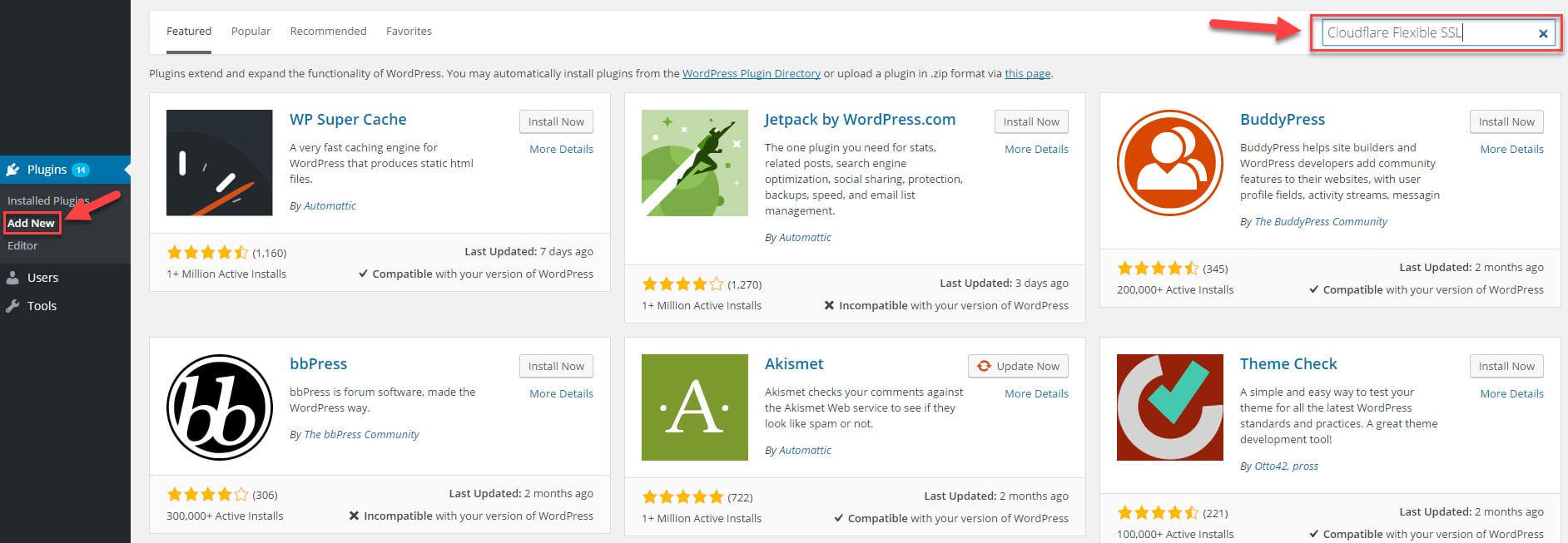
5. Login เข้าสู่ระบบ Admin WordPress ของเว็บไซต์ที่จะนำไปใช้งาน จากนั้น เลือกเมนู Plugin -> Add New และค้นหาปลั๊กอิน CloudFlare Fiexible SSL
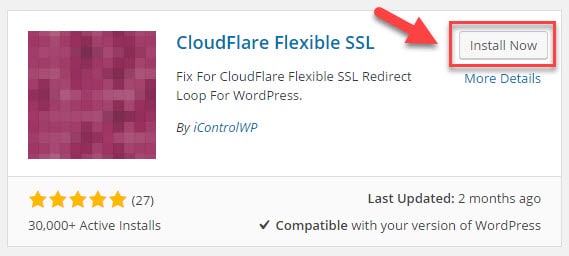
6. กด Install Now เพื่อดำเนินการติดตั้งปลั๊กอิน CloudFlare Fiexible SSL เมื่อดำเนินการติดตั้งเรียบร้อยแล้ว ให้กด ใช้งานปลั๊กอิน (Active)
บทความ/ความรู้ ที่น่าสนใจ
- Categories:
- Cloud
- Tags:
- Cloud
- Cloud Server
Related Posts
หมวดหมู่ที่น่าสนใจ
- Account Settings
- AD Server
- AI
- Alibaba Cloud
- Anti-Spam Gateway
- AWS Amazon Web Services
- Campaign
- CentOS/AlmaLinux
- Cloud
- Cloud Backup
- Cloud Communication
- Cloud Migration
- Cloud Security
- Cloud Server Management
- Cloud Solution
- Cloud Solution for Government
- Cloud Solutions by Industry
- Cloud Storage
- Cloud VPS App Plus +
- Cloud VPS DirectAdmin
- Cloud VPS Plesk
- CSR
- Cyber Security
- Cybersecurity
- Data Sovereignty
- Database Server
- DDoS
- Digital Tranformation
- Digital Transformation
- Direct Mail
- Directadmin
- Domainname
- Ecommerce
- ERP
- Generative AI
- Getting Started
- Google Cloud
- Google G Suite
- Huawei Cloud
- IT News
- Linux Server
- Managed Cloud Services
- Managed Service Provider
- Manual
- Microsoft
- Microsoft 365
- Microsoft Azure
- News
- On-premise
- Private Mail Server
- Promotion
- Recommend Solution (Enterprise)
- Server
- Sovereign Cloud
- THAI DATA CLOUD Platform
- Ubuntu
- Ubuntu
- Uncategorized
- VMware
- VPS Server
- Web Design
- Web Hosting
- Web Hosting (DirectAdmin)
- Web Hosting (Plesk)
- Web Technologies
- Windows Server
- Wordpress
- Zimbra
- เรื่องราวความประทับใจ
- โซลูชันสำหรับธุรกิจการผลิตและยานยนต์
- โซลูชันสำหรับธุรกิจการศึกษา
- โซลูชันสำหรับธุรกิจการเงิน
- โซลูชันสำหรับธุรกิจขนส่งและกระจายสินค้า
- โซลูชันสำหรับธุรกิจค้าปลีก
- โซลูชันสำหรับธุรกิจท่องเที่ยว
- โซลูชันสำหรับธุรกิจบริการสุขภาพและโรงพยาบาล
- โซลูชันสำหรับธุรกิจประกันภัย
- โซลูชันสำหรับธุรกิจพลังงานและสาธารณูปโภค
- โซลูชันสำหรับธุรกิจสื่อสารมวลชนและเอ็นเตอร์เทนเมนท์
- โซลูชันสำหรับธุรกิจอสังหาริมทรัพย์
- โซลูชันสำหรับธุรกิจเทคโนโลยี