การตั้งค่าปฏิทินบน Zimbra mail
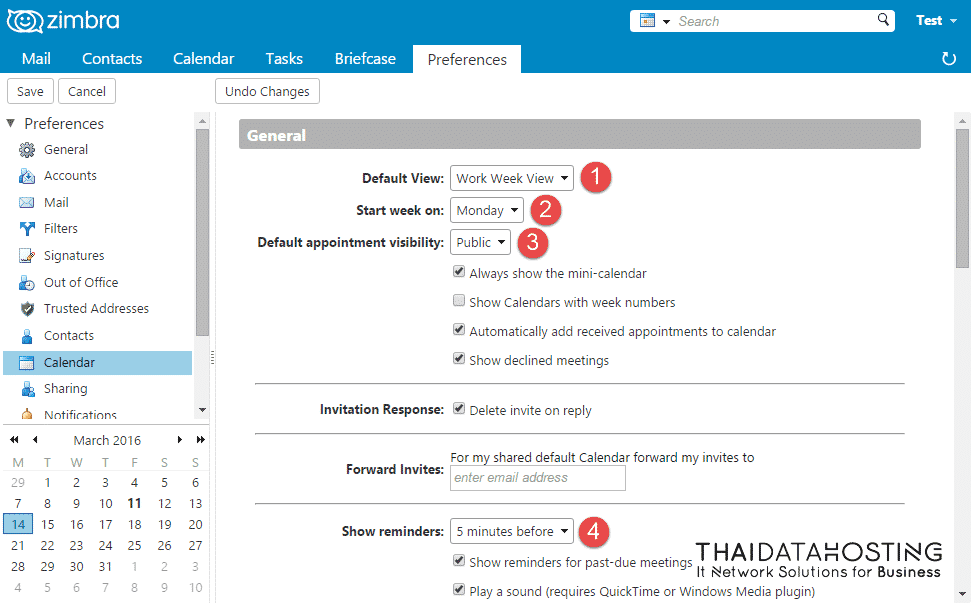
1. ไปที่หน้า Preferences > Calendar ที่หัวข้อ General
- Default View: การตั้งค่าหน้าเริ่มต้นของปฏิทิน
1. Day View จะแสดงเพียงตารางของวันนั้นๆ
2. Work Week View จะแสดงวันทำงานของ 1 สัปดาห์
3. 7 Day Week View จะแสดงวันทั้งหมดของสัปดาห์
4. Month View จะแสดงวันทั้งหมดของเดือน
5. List View จะแสดงตารางนัดหมายทั้งหมด - Start week on: การตั้งค่าวันเริ่มต้นของสัปดาห์
- Default appointment visibility: การตั้งค่าปฏิทินเป็นส่วนตัว หรือสาธารณะ
- Show reminders: การตั้งค่าเวลาแสดงการแจ้งเตือนก่อนถึงเวลานัดหมาย
2. Work week: การตั้งค่าการทำงานภายใน 1 สัปดาห์
Work hours: การตั้งค่าเวลาทำงานใน 1 วัน เมื่อตั้งค่าเรียบร้อย คลิก Save เพื่อทำการบันทึก
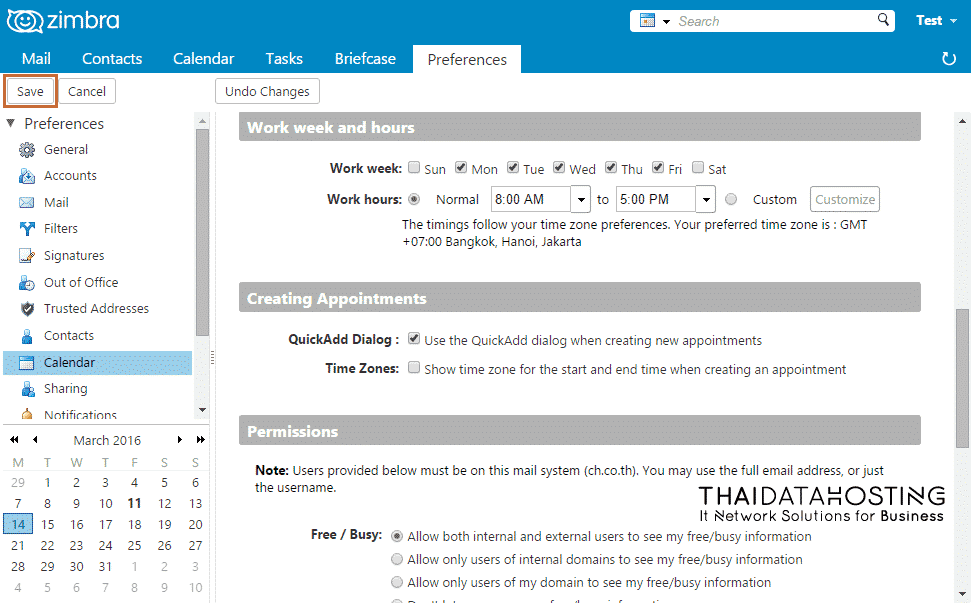
การตั้งค่า Calendar Zimbra mail
- Categories:
- Cloud
- Tags:
- Cloud
- Cloud Server
Related Posts
หมวดหมู่ที่น่าสนใจ
- Account Settings
- AD Server
- AI
- Alibaba Cloud
- Anti-Spam Gateway
- AWS Amazon Web Services
- Campaign
- CentOS/AlmaLinux
- Cloud
- Cloud Backup
- Cloud Communication
- Cloud Migration
- Cloud Security
- Cloud Server Management
- Cloud Solution
- Cloud Solution for Government
- Cloud Solutions by Industry
- Cloud Storage
- Cloud VPS App Plus +
- Cloud VPS DirectAdmin
- Cloud VPS Plesk
- CSR
- Cyber Security
- Cybersecurity
- Data Sovereignty
- Database Server
- DDoS
- Digital Tranformation
- Digital Transformation
- Direct Mail
- Directadmin
- Domainname
- Ecommerce
- ERP
- Generative AI
- Getting Started
- Google Cloud
- Google G Suite
- Huawei Cloud
- IT News
- Linux Server
- Managed Cloud Services
- Managed Service Provider
- Manual
- Microsoft
- Microsoft 365
- Microsoft Azure
- News
- On-premise
- Private Mail Server
- Promotion
- Recommend Solution (Enterprise)
- Server
- Sovereign Cloud
- THAI DATA CLOUD Platform
- Ubuntu
- Ubuntu
- Uncategorized
- VMware
- VPS Server
- Web Design
- Web Hosting
- Web Hosting (DirectAdmin)
- Web Hosting (Plesk)
- Web Technologies
- Windows Server
- Wordpress
- Zimbra
- เรื่องราวความประทับใจ
- โซลูชันสำหรับธุรกิจการผลิตและยานยนต์
- โซลูชันสำหรับธุรกิจการศึกษา
- โซลูชันสำหรับธุรกิจการเงิน
- โซลูชันสำหรับธุรกิจขนส่งและกระจายสินค้า
- โซลูชันสำหรับธุรกิจค้าปลีก
- โซลูชันสำหรับธุรกิจท่องเที่ยว
- โซลูชันสำหรับธุรกิจบริการสุขภาพและโรงพยาบาล
- โซลูชันสำหรับธุรกิจประกันภัย
- โซลูชันสำหรับธุรกิจพลังงานและสาธารณูปโภค
- โซลูชันสำหรับธุรกิจสื่อสารมวลชนและเอ็นเตอร์เทนเมนท์
- โซลูชันสำหรับธุรกิจอสังหาริมทรัพย์
- โซลูชันสำหรับธุรกิจเทคโนโลยี